
Table of contents
1. What is Claude Design?
2. At a glance: what Claude Design does
3. What does Claude Design change for product teams?
4. A practical Claude Design workflow
5. What Claude Design does not replace
6. Who benefits most, and where to be careful
7. Risks and governance product teams should plan for
8. How to measure whether it is working
9. Comparison table: choosing how to use Claude Design
10. How to adopt Claude Design in five steps
11. Frequently asked questions
12. Final thoughts
13. Related articles
14. Sources
| BOOK A COMPLIMENTARY CONSULTATION Planning a product on Claude Design? Get a free 30-minute discovery call with a senior ZeeFrames designer. |
Product teams used to move from idea to something clickable in weeks. In 2026 a founder can describe a screen in plain language and have an interactive first draft before the meeting ends. That is the promise of Claude Design, and it is changing how teams explore, prototype and hand off product work. It is not changing who is accountable for whether the product is any good.
This guide explains what Claude Design is, what it genuinely changes, where it still needs senior human judgement, and how a UI UX Design Agency can adopt it without shipping fast-but-flawed interfaces. It is the hub of our Claude Design series; later articles go deeper on workflow, prototyping, design systems and handoff.
| QUICK ANSWER Claude Design is Anthropic’s feature for creating designs, interactive prototypes, landing pages, dashboards and other visual work through conversation. For product teams it compresses exploration and prototyping from days to hours, but usability testing, accessibility review and product strategy still need human experts. |
| GOOD TO KNOW ZeeFrames is an independent product design partner. We use Claude and other AI tools as external products and have no affiliation with, or endorsement from, Anthropic. Product details below come from Anthropic’s public documentation and press coverage, linked in Sources. |
What is Claude Design?
Definition: Claude Design is a Claude feature, built by Anthropic Labs, that turns a conversation into designs, interactive prototypes, one-pagers, dashboards, landing pages, onboarding flows and internal tools. You describe what you need, Claude produces a first version, and you refine it through chat, inline comments, direct canvas edits and generated sliders for spacing and colour.
Anthropic launched it on April 17, 2026 as a research preview, powered at launch by Claude Opus 4.7 according to MacRumors. It is not an image generator; it builds structured, editable design and prototype output. Anthropic’s help centre now describes it as available on every plan and usable in any Claude chat, in Claude Code and from the Artifacts tab.
| Apr 17, 2026 Launched by Anthropic Labs | 5+ formats PDF, PPTX, HTML, ZIP, Google Slides | Oct 15, 2026 Enterprise default-on date | Dec 14, 2026 Standalone site closes |
Key dates and facts from Anthropic’s documentation (checked Oct 26, 2026).
At a glance: what Claude Design does
| Capability | What it means | Product-team impact |
| Prompt to prototype | Generates a first design from a description or reference | Faster first drafts for stakeholder discussion |
| Design system import | Reads a GitHub repo, design files or local codebase | On-brand output, quality depends on the source |
| Refinement tools | Chat, inline comments, canvas edits, custom sliders | Quick iteration without a full tool switch |
| Export | PDF, PPTX, HTML, ZIP, Google Slides, Canva and more | Easy sharing and reuse |
| Claude Code handoff | /design and /design-sync with Claude Code | Shorter path from design to working frontend |
What does Claude Design change for product teams?
Five direct answers, each of which we expand in later articles.
1. Exploration becomes cheap
Teams can compare many directions for an onboarding flow, dashboard or landing page in the time it once took to polish one. The value is not the pixels; it is that bad ideas die earlier and better questions surface sooner.
2. Prototypes become the conversation
Instead of debating a static mockup, stakeholders click through something interactive. Founders, product managers and marketers without a design background can now take part directly, which Anthropic cites as a target audience.
3. Design systems matter more, not less
Claude Design builds with your components when you import a design system, and checks output against it. Messy tokens, inconsistent components or an out-of-date repo produce messy output. A clean design system is now a speed multiplier.
4. Handoff gets shorter
Work moves between Claude Design and Claude Code, and out to tools such as Canva, Adobe, Miro, Vercel and others. The gap between design intent and frontend code narrows, which raises the stakes for engineering review.
5. Judgement becomes the scarce skill
When producing screens is easy, deciding which screens deserve to exist is the hard part. Research, prioritisation, accessibility and validation become the differentiators.
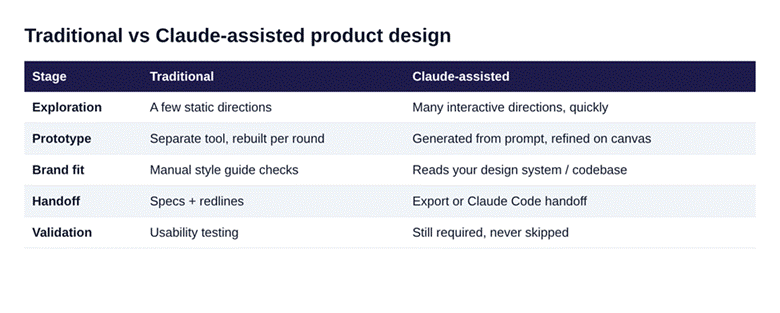
Figure 1. Where a Claude-assisted workflow differs from a traditional one.
A practical Claude Design workflow
This is the framework we recommend for product teams; it is a recommended process, not a claim about any specific client outcome.
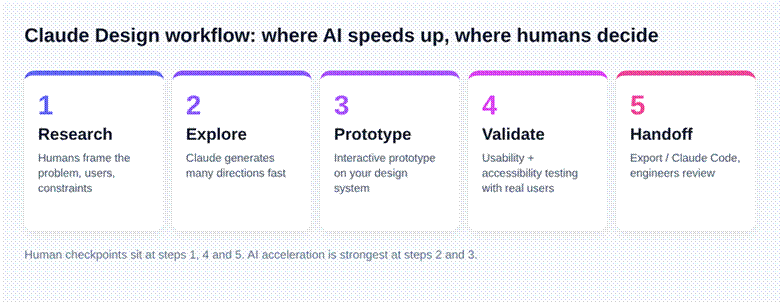
Figure 2. Research, Explore, Prototype, Validate, Handoff, with human checkpoints marked.
1.Research (human-led). Define the user, the job to be done, constraints and success metrics before opening any tool.
2.Explore (AI-accelerated). Ask for several directions with explicit constraints. Compare them against the problem, not against taste.
3.Prototype (AI-accelerated). Import your design system, build the key flow and refine on the canvas.
4.Validate (human-led). Test with real users, run accessibility checks and verify business rules.
5.Handoff (shared). Export or hand to Claude Code, then have engineers review code quality, performance and edge cases.
What Claude Design does not replace
•User research and validation. A convincing prototype is not evidence that users understand it.
•Accessibility and inclusive design. Contrast, keyboard paths and screen-reader behaviour need deliberate checks.
•Product strategy. AI cannot decide your positioning, pricing logic or roadmap trade-offs.
•Design system governance. Anthropic notes that migrated design systems are not always accurate and may need cleanup.
Anthropic’s own documentation also lists practical limits: no version history yet, basic multi-person editing, lag with very large codebases, and design activity counting toward shared plan usage limits.
| FREE UX REVIEW Already have an AI-generated prototype? ZeeFrames can review it for usability, accessibility and consistency before it reaches engineering. |
Who benefits most, and where to be careful
Claude Design suits different teams in different ways. The right question is not whether to use it, but how much validation each context demands.
•SaaS and AI products. Onboarding flows, dashboards and settings screens are well suited to rapid exploration. Keep a human owner for information architecture and activation metrics.
•FinTech and HealthTech. Speed helps with early concepts, but regulated flows need compliance, security and accessibility review before any prototype is treated as a candidate for release.
•E-commerce and EdTech. Landing pages and campaign visuals can be produced quickly; conversion and learning outcomes still need testing against real behaviour.
•Founders without a design background. It lowers the barrier to expressing an idea, which is valuable for investor conversations and early user interviews, as long as the output is treated as a hypothesis.
Risks and governance product teams should plan for
Faster output creates faster mistakes. Three risks deserve explicit owners from day one.
Consistency drift. If several people generate screens independently, the product can slowly diverge from its design system. Name one person responsible for system integrity and restrict teams to one approved design system where possible.
Accessibility gaps. Generated interfaces can look polished while failing contrast, focus order or label requirements. Treat accessibility checks as a required gate, not a final polish step.
Over-trusting prototypes. A prototype that feels real can create false confidence. Record what has been tested, with whom, and what has not, before engineering starts.
How to measure whether it is working
Avoid vanity metrics such as the number of screens generated. Track outcomes that connect to product results instead: time from brief to testable prototype, number of design directions evaluated before commitment, usability test pass rates, accessibility defects found before release, and rework requested by engineering after handoff. Baseline these before you adopt Claude Design so you can show a real before and after rather than an impression.
Comparison table: choosing how to use Claude Design
| Approach | Best for | Strength | Watch out for |
| DIY in-house | Early ideas, internal tools | Fastest and cheapest | Unvalidated UX, inconsistent system |
| AI plus senior designer | Customer-facing SaaS, AI products | Speed with judgement | Needs a clear brief and owner |
| Traditional only | Highly regulated or complex flows | Deep research rigor | Slower exploration |
How to adopt Claude Design in five steps
| Step | Action |
| Week 1 | Pick one low-risk flow (for example onboarding). Audit and clean your design system. |
| Week 2 | Run Claude Design explorations. Agree the review criteria in advance. |
| Week 3 | Build an interactive prototype and test it with five to eight users. |
| Week 4 | Hand off to engineering via export or Claude Code. Review code and accessibility. |
| Ongoing | Document what worked, retire what did not, and extend to the next flow. |
Pre-launch checklist
• Does the design solve a validated user problem?
• Does it match our design system tokens and components?
• Has it passed contrast and keyboard accessibility checks?
• Are empty, error and loading states designed?
• Has an engineer reviewed the generated code?
• Is there any dark pattern or misleading copy?

Talk to a senior ZeeFrames designer about your Claude Design workflow.
Frequently asked questions
What is Claude Design?
It is Anthropic’s feature for creating designs, prototypes, dashboards and landing pages through conversation, with export and Claude Code handoff.
Is Claude Design free?
Anthropic’s help centre says it is available on Free, Pro, Max, Team and Enterprise plans, and design activity counts toward shared usage limits. Check current details, as plans change.
Can Claude Design replace a product designer?
No. It speeds up exploration and prototyping, but research, validation, accessibility and strategy still need human expertise.
Can Claude Design hand off to developers?
Yes. You can export files or hand work to Claude Code, then engineers should review the result.
Is ZeeFrames affiliated with Anthropic?
No. ZeeFrames is an independent design partner that uses Claude as an external tool.
Final thoughts
Claude Design makes the first draft cheap. It does not make the right product cheap. Teams that win in 2026 will use it to explore widely, then apply senior judgement to validate, refine and ship. If you would like a second pair of experienced eyes on your workflow, our team is happy to help.
| NEXT STEP Book a free 30-minute discovery call or request a UX review with ZeeFrames. Continue reading: Claude UI/UX Design Workflow for SaaS Teams (Day 2). |
Related articles
• Claude UI/UX Design Workflow for SaaS Teams
• AI Product Design with Claude: Human + AI Workflow
• Claude Design System Workflow: Tokens, Components and Consistency
Sources
• Anthropic Help Center: Get started with Claude Design

 English
 French
 Spanish
 Deutsch
 Turkish
 Russian