
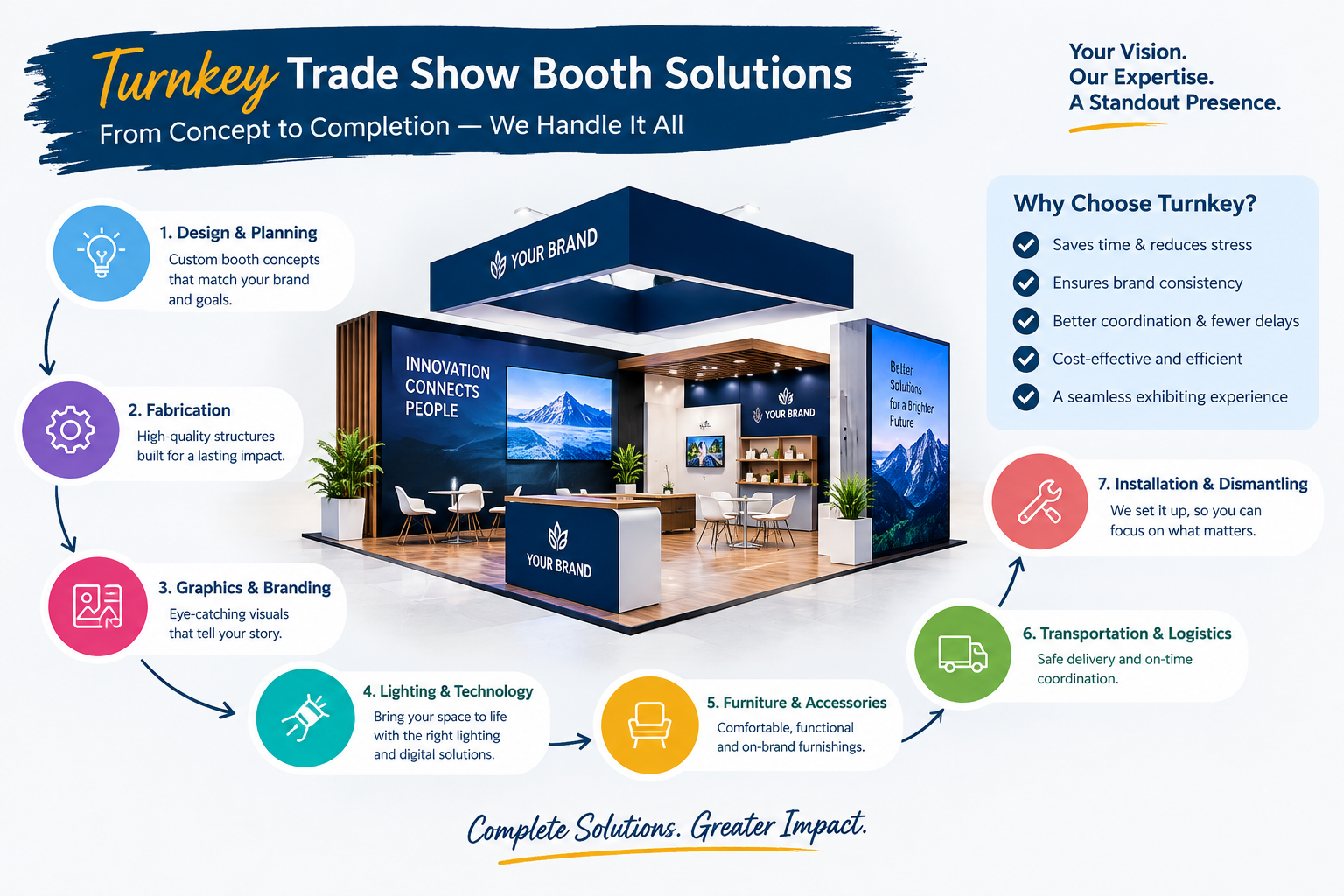
Trade shows provide businesses with valuable opportunities to showcase products, build relationships, and connect with potential customers. However, attracting attention in a crowded exhibition hall requires more than an attractive display. Companies must combine creative booth design, effective branding, and engaging technology to create an experience that encourages visitors to stop, explore, and interact. Professional Las Vegas trade show booth builders help businesses bring these elements together by designing exhibition spaces that balance visual appeal, functionality, and interactive experiences. From digital displays and immersive demonstrations to strategic lighting and accessible layouts, the right combination of technology and design can help brands stand out and generate meaningful business opportunities.
Why Technology and Design Matter at Trade Shows
Exhibition halls are highly competitive environments where multiple brands attempt to capture the attention of the same audience. Visitors often have limited time to explore every booth, making first impressions particularly important.
An effective booth should communicate a company's identity, explain its products or services, and encourage visitors to take the next step. Design creates the visual foundation, while technology can make information more accessible, demonstrations more engaging, and interactions more memorable.
When these elements work together, the booth becomes more than a display. It becomes an environment where visitors can experience a brand's value.
Businesses should remember that technology is not a substitute for good design. A large screen cannot compensate for confusing messaging, poor lighting, or an inconvenient layout. The strongest exhibition experiences integrate digital tools into a clear and purposeful design strategy.
1. Digital Displays That Capture Attention
Digital displays are among the most recognizable technologies used in modern exhibition booths. They allow companies to present product videos, animations, demonstrations, promotional messages, and customer testimonials.
Unlike static graphics, digital content can be updated to communicate different messages throughout an event.
For example, a manufacturing company might use a large screen to show how its equipment operates, while a software business could demonstrate key platform features through a guided presentation.
To use digital displays effectively:
-
Position screens where visitors can see them from the aisle.
-
Use high-quality visuals and concise messages.
-
Keep text readable from the intended viewing distance.
-
Avoid excessive animation that distracts from the main message.
-
Ensure that screen content matches your brand identity.
-
Test the equipment before the exhibition opens.
The screen should support the booth's primary objective rather than become a decorative feature without a clear purpose.
2. Interactive Touchscreens for Visitor Engagement
Interactive touchscreens allow visitors to explore information at their own pace. They can browse product catalogs, compare specifications, view case studies, or learn about services without waiting for a staff member to deliver every detail.
This approach can be particularly useful when a business offers a broad product range or serves multiple customer segments.
For example, an industrial supplier might organize its products by application, allowing visitors to select the category most relevant to their needs. A technology company could provide an interactive product tour that highlights important features.
Touchscreens should be intuitive and easy to use. Visitors should be able to understand the available options quickly and navigate the content without unnecessary steps.
Consider including a clear call to action, such as requesting a demonstration, downloading a product guide, or arranging a consultation.
Always test touchscreen responsiveness, software compatibility, and connectivity requirements before the event.
3. Strategic Lighting That Enhances Booth Design
Lighting has a major influence on how an exhibition booth looks and feels. It can highlight important products, improve visibility, establish visual hierarchy, and make the display more inviting.
A well-planned lighting strategy can help direct attention toward the features that matter most.
Common lighting applications include:
-
Accent lighting for featured products.
-
Illuminated logos and signage.
-
General lighting for visitor areas.
-
Task lighting for demonstration stations.
-
Integrated lighting for display structures.
For example, a premium product launch might use focused lighting to emphasize the featured item, while a technology booth could combine balanced illumination with digital displays.
The objective is to create a coherent visual experience rather than use as many lighting effects as possible.
Coordinate lighting with the booth's colors, materials, graphics, and available electrical infrastructure. Confirm venue restrictions and power requirements before finalizing the installation plan.
4. Immersive Experiences Using Augmented and Virtual Reality
Augmented reality (AR) and virtual reality (VR) can help exhibitors demonstrate products or environments that are difficult to present physically.
AR can overlay digital information onto a real-world view, while VR can provide an immersive simulated environment.
These technologies may be useful for businesses that sell large machinery, complex equipment, architectural solutions, or products that require extensive demonstrations.
For example, a manufacturer could use a virtual environment to show how a production system operates, while an architectural company might let visitors explore a proposed building design.
However, immersive technology requires careful planning. Businesses should consider equipment costs, setup time, available space, staff assistance, and the amount of time visitors are willing to spend.
Experiences should be short, relevant, and comfortable for participants.
When implemented thoughtfully, AR and VR can help visitors understand complex offerings and remember the experience more easily.
5. Custom Booth Layouts That Support Technology
Technology must be integrated into the physical layout rather than added after the booth design is complete.
Screens, interactive stations, demonstration equipment, cables, power connections, and seating all require suitable space. Poor planning can create clutter, obstruct movement, or make the display difficult to use.
A custom booth layout should account for how visitors will approach, explore, and interact with the display.
Consider creating separate zones for different activities:
Brand awareness zone: Prominent branding, headline messaging, and digital content visible from the aisle.
Product exploration zone: Physical displays, interactive screens, and product information.
Demonstration zone: Equipment or presentation areas where visitors can observe the product in action.
Meeting zone: Seating or consultation space for detailed discussions.
Support zone: Storage, cables, supplies, and other operational requirements.
Not every booth needs all five zones. The layout should reflect the available floor space and the company's exhibition objectives.
Professional booth designers can help balance these requirements while preserving an open and welcoming visitor experience.
6. LED Walls and Large-Format Visual Displays
Large LED displays can create a strong visual focal point within an exhibition booth. They are useful for presenting brand films, product demonstrations, animated graphics, and event-specific messages.
A large-format screen may be particularly effective when the exhibitor wants to communicate a complex concept through visual storytelling.
However, size alone does not guarantee engagement. The content must be relevant, visually clear, and appropriate for the audience.
Use a strong opening visual, a concise message, and a clear connection to your products or services. Avoid placing too much information on the screen at once.
Consider viewing distance, screen placement, brightness, power requirements, and venue regulations during planning.
The surrounding booth design should complement the display instead of competing with it. When integrated carefully, a large screen can reinforce the brand identity and help visitors understand the company's value proposition.
7. Data-Driven Personalization and Digital Lead Capture
Technology can also improve how businesses interact with visitors and organize sales opportunities.
Digital lead-capture tools allow staff to record visitor information and relevant conversation details. Depending on the event and available systems, this may involve badge scanning, digital forms, QR codes, or customer relationship management software.
A well-designed process can reduce manual data entry and help sales teams prioritize follow-up activities.
For example, visitors interested in different product categories can be directed toward relevant demonstrations or resources. Staff can record their requirements and agree on appropriate next steps.
Businesses should collect only the information they need, explain how it will be used, and follow applicable privacy requirements.
Keep the process simple so that registration does not interrupt the visitor experience.
The purpose of lead capture is not simply to collect more contacts. It is to identify relevant prospects and make subsequent conversations more useful.
8. QR Codes That Connect Physical and Digital Experiences
QR codes provide a convenient link between booth visitors and online resources.
Instead of carrying printed materials for every product, exhibitors can use QR codes to direct attendees to digital catalogs, technical documents, demonstration videos, registration pages, or contact forms.
For example, a product display could include a QR code linking to specifications, while a demonstration station might provide access to a detailed case study.
To make QR codes effective:
-
Place them where visitors can scan them comfortably.
-
Explain what the visitor will receive after scanning.
-
Use mobile-friendly landing pages.
-
Test every code before the exhibition.
-
Avoid requiring unnecessary registration steps.
-
Provide an alternative for visitors who prefer direct assistance.
QR codes should complement face-to-face conversations rather than replace them.
When placed thoughtfully, they help visitors continue exploring your products after leaving the booth.
9. Sound and Audiovisual Integration
Audio can support product demonstrations, presentations, and branded content. However, exhibition halls are often noisy, and multiple booths may operate simultaneously.
Poorly managed sound can make it difficult for visitors to hear demonstrations or communicate with staff.
Before adding speakers or microphones, determine whether audio is essential to the experience.
For short demonstrations, directional speakers or headphones may be more suitable than broadcasting sound throughout the booth. For presentations, consider the number of attendees, room layout, and surrounding noise.
Coordinate audiovisual equipment with the booth's electrical and structural requirements.
Ensure that volume levels remain appropriate and comply with venue rules.
A successful audiovisual setup improves communication without making the booth uncomfortable for nearby exhibitors or visitors.
10. Technology That Makes Product Demonstrations More Effective
Many products are easier to understand when visitors can see how they work.
Digital simulations, demonstration screens, live equipment, and interactive models can explain features that might otherwise require lengthy verbal descriptions.
For example, a logistics company could demonstrate a tracking platform, while an equipment manufacturer could combine a physical product sample with an animated explanation of its internal operation.
Plan demonstrations around the questions your audience is most likely to ask.
Each demonstration should have a clear objective, a manageable duration, and a trained presenter. Prepare backup videos or alternative presentations in case equipment cannot operate as expected.
Ensure that demonstration areas allow visitors to view the content safely and comfortably.
Technology is most valuable when it simplifies complex information and helps attendees understand the practical benefits of your offering.
11. Sustainable Materials and Energy-Efficient Technology
Modern booth design can combine innovation with sustainability.
Businesses may choose modular structures, reusable components, durable materials, energy-efficient lighting, and digital resources that reduce dependence on disposable printed materials.
Rental displays can also provide an alternative to purchasing structures that may be used only occasionally.
However, sustainability should be evaluated across the full project rather than based on a single feature. Transportation, storage, maintenance, manufacturing, and disposal can all affect the overall environmental impact.
Discuss your sustainability priorities with the design team early in the project.
Ask whether components can be reused, whether graphics can be replaced without rebuilding the structure, and how materials will be handled after the event.
A thoughtful approach can help businesses reduce unnecessary waste while maintaining a professional and visually appealing display.
12. Creating a Consistent Brand Experience
Technology and design should communicate a consistent brand identity across every part of the booth.
A display can become confusing when its graphics, digital content, lighting, and physical structures use unrelated visual styles or competing messages.
Begin with a clear creative direction that reflects your brand guidelines.
Use consistent colors, typography, logos, imagery, and messaging across physical signage and digital displays.
Your main message should remain recognizable whether visitors see it on a large screen, a product panel, a brochure, or a digital presentation.
Keep supporting content aligned with the same value proposition. If your company emphasizes reliability, for example, product demonstrations and customer stories should reinforce that message.
Consistency makes the booth easier to understand and helps visitors connect individual features with the overall brand.
13. Improving Accessibility Through Thoughtful Design
Technology should make a booth easier to explore, not create unnecessary barriers.
Visitors have different physical abilities, technical experience, and communication preferences. A successful design should provide practical ways for people to access information and interact with your team.
Consider clear signage, accessible pathways, appropriate screen placement, readable text, and intuitive interfaces.
Provide alternatives for visitors who cannot or do not want to use a particular interactive feature. For example, staff members should be available to explain information displayed on a touchscreen.
Video content may benefit from captions, while digital interfaces should use clear language and visible navigation.
Review applicable accessibility requirements for the venue and event.
An inclusive approach can improve the experience for a broader audience and demonstrate that your company values usability.
14. Why Experienced Las Vegas Booth Builders Make a Difference
Integrating technology into an exhibition display requires coordination between design, electrical planning, graphics, equipment selection, installation, and visitor flow.
An experienced booth builder can help businesses determine which features are practical and how to incorporate them into the available space.
Depending on the agreed services, the provider may assist with:
-
Booth concept development and layout planning.
-
Custom structures or rental components.
-
Graphic design and production.
-
Lighting and audiovisual integration.
-
Furniture and product display planning.
-
Coordination of installation requirements.
-
Dismantling and post-event arrangements.
When evaluating potential partners, review their portfolios and ask about experience with similar technical requirements.
Share your budget, target audience, products, and exhibition goals early. Request a detailed proposal that explains the scope of work, equipment requirements, deadlines, and any additional charges.
A collaborative planning process helps ensure that technology supports the design rather than complicating it.
15. How to Measure the Impact of Technology and Design
An impressive booth should contribute to measurable business objectives.
Before the event, define what success means for your company. You might prioritize qualified leads, product demonstrations, meetings with target accounts, brand awareness, or sales opportunities.
After the exhibition, evaluate whether the technology and design helped achieve those goals.
Useful indicators include:
-
Number of qualified leads collected.
-
Participation in product demonstrations.
-
Visitor engagement with interactive features.
-
Meetings arranged with potential customers.
-
Requests for product information or quotations.
-
Sales opportunities generated.
-
Feedback from visitors and booth staff.
For example, if an interactive product display receives little engagement, consider whether its location, instructions, or content need improvement.
If demonstrations consistently attract qualified prospects, you may want to expand that experience at future events.
Measure outcomes rather than assuming that expensive technology automatically produces better results.
16. Common Mistakes to Avoid When Combining Technology and Design
Businesses can improve their exhibition strategy by avoiding several common mistakes.
Adding technology without a clear purpose: Every screen or interactive feature should support a defined visitor need or marketing objective.
Overcrowding the booth: Too many displays and equipment stations can restrict movement and reduce accessibility.
Ignoring technical requirements: Power, internet access, mounting, and equipment compatibility should be addressed before the event.
Using complicated interfaces: Visitors may abandon an interactive experience if it requires too many steps or instructions.
Neglecting staff training: Team members should understand how to operate the equipment and explain its relevance to visitors.
Failing to prepare backups: Keep alternative presentation materials available in case a device or connection fails.
Forgetting post-event follow-up: Digital engagement is most useful when it connects to an effective lead-management process.
Avoiding these problems helps businesses create a more reliable and engaging exhibition experience.
Conclusion
Combining technology with thoughtful booth design can help businesses capture attention, explain complex products, and create meaningful visitor interactions at competitive exhibitions. Digital displays, interactive demonstrations, strategic lighting, QR codes, and lead-capture tools can all contribute when they serve a clear purpose. The key is to integrate these features into an accessible layout with consistent branding and well-trained staff. By working with experienced Las Vegas trade show booth builders, businesses can develop exhibition displays that balance innovation, functionality, and visual appeal while supporting stronger visitor engagement and measurable marketing results.

 English
 French
 Spanish
 Turkish
 Italiano
 Russian