
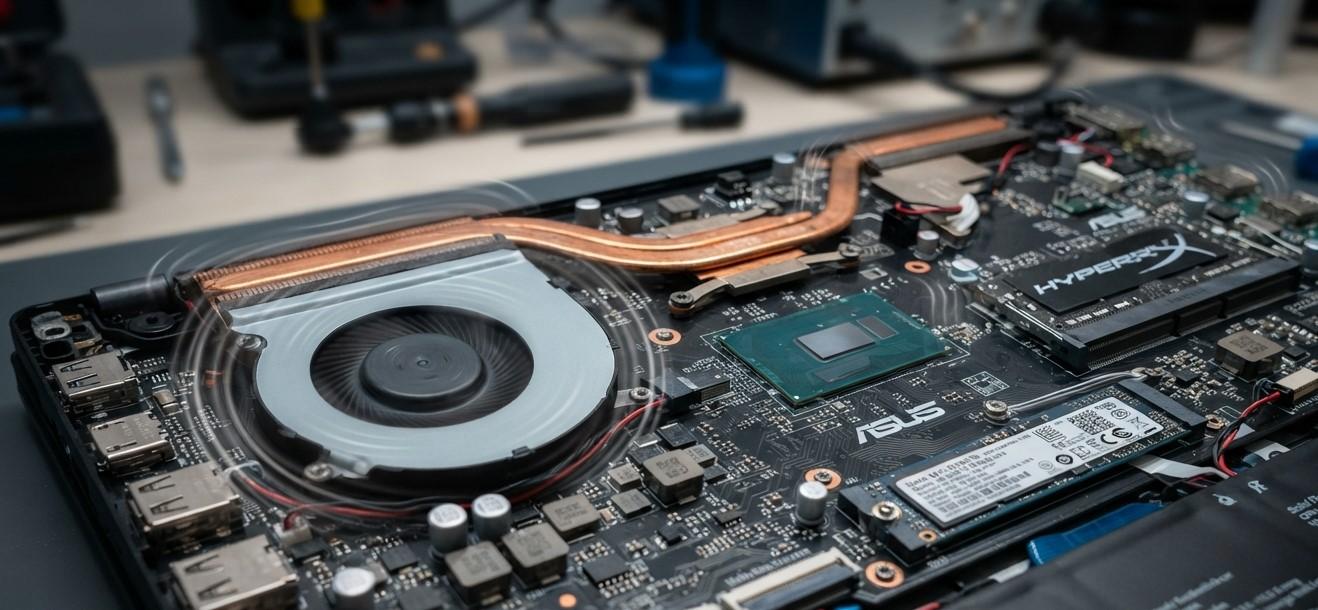
Laptops contain numerous compact components that must remain securely connected for the system to operate reliably. Although modern laptops are designed to handle normal movement, internal vibrations generated by cooling fans, mechanical storage devices, and other moving parts can contribute to hardware wear over long periods. Repeated vibration may place stress on connectors, cables, mounting points, and other components, potentially leading to intermittent hardware behavior. Understanding laptop vibration damage prevention can help users recognize early warning signs and reduce unnecessary stress on internal hardware. At iPC Repair Houston, technicians can inspect internal components when unusual noises, intermittent failures, or performance changes develop. If vibration-related symptoms involve the display, laptop screen repair Houston can help determine whether the problem affects the screen, display cable, connector, or surrounding hardware. Customers searching for screen repair Houston TX can also request a complete hardware inspection.
Where Do Laptop Vibrations Come From?
Not every laptop vibration indicates a serious problem.
Common sources include:
- Cooling fans
- Mechanical hard drives
- Loose internal components
- Worn fan bearings
- External surfaces transferring vibration into the device
Solid-state drives generally have no moving parts, so laptops equipped with SSDs typically have fewer internally generated mechanical vibrations than systems using traditional hard disk drives.
However, cooling fans remain a common source of movement inside many laptops.
How Cooling Fans Create Vibration
Laptop fans spin at high speeds to move hot air away from internal components.
A healthy fan should operate smoothly, but dust buildup, worn bearings, or physical damage can cause uneven rotation.
Users may notice:
- Humming
- Rattling
- Clicking
- Excessive vibration
- Changing fan noise
When a fan becomes unbalanced, the resulting vibration can place additional stress on its mounting points and nearby components.
A noisy or vibrating fan should therefore be inspected rather than ignored.
Mechanical Hard Drives Can Produce Movement
Traditional hard disk drives contain spinning platters and moving read/write heads.
These mechanical parts naturally produce some vibration during operation.
Over time, excessive vibration can potentially contribute to mechanical wear or aggravate an already aging drive.
Warning signs of storage problems can include:
- Unusual clicking sounds
- Slow file access
- Frequent freezing
- Startup delays
- File errors
Users with important data on a mechanical drive should maintain regular backups.
Vibration Can Affect Internal Connectors
Laptop components communicate through numerous connectors and cables.
Repeated movement or vibration may contribute to connection problems, particularly when hardware is already worn or a connector is not firmly secured.
Potential symptoms include:
- Intermittent device detection
- Charging interruptions
- USB failures
- Keyboard problems
- Display interruptions
These symptoms may appear and disappear depending on the laptop's position or movement.
Display Connections Can Be Sensitive
The display assembly is connected to the motherboard through a display cable and related connectors.
If these connections become damaged or loose, vibration or movement may make symptoms more noticeable.
Users might experience:
- Screen flickering
- Temporary black screens
- Lines across the display
- Intermittent image loss
- Brightness changes
For laptop screen repair Houston, technicians can inspect the display panel, cable, hinges, connectors, and related hardware. Customers searching for screen repair Houston TX can also request a complete diagnostic to determine whether display symptoms are related to a connection problem or another internal fault.
Vibration Combined With Heat Can Increase Stress
Heat and vibration can sometimes affect hardware at the same time.
A laptop operating under high temperatures may already have components and connections experiencing thermal expansion and contraction. Adding repeated mechanical vibration can increase overall environmental stress.
For example, a laptop with:
- A worn cooling fan
- Poor ventilation
- Dust buildup
- Loose internal connections
may experience several symptoms at once.
Maintaining the cooling system can therefore help reduce both excessive heat and vibration-related problems caused by fan deterioration.
Physical Movement Is Also Important
Internal vibration is not the only form of mechanical stress.
Regular transportation, accidental bumps, placing the laptop on unstable surfaces, or moving the device while operating can also affect internal connections.
Portable laptops are exposed to more movement than desktop computers, making careful handling important.
Users should avoid:
- Dropping the laptop into bags
- Carrying it while the lid is open
- Placing heavy objects on it
- Moving it unnecessarily while connected to cables
Signs That Vibration May Be Affecting Hardware
Vibration-related problems may be difficult to identify because they can resemble other hardware faults.
Potential warning signs include:
- New rattling or clicking sounds
- Intermittent display problems
- Random device disconnections
- Charging interruptions
- Unusual fan behavior
- Storage errors
- Problems that occur when the laptop is moved
If a problem consistently appears after movement, the internal connections and mechanical components should be inspected.
How to Reduce Vibration-Related Hardware Stress
Several practical habits can help protect laptop components.
Keep the Cooling System Clean
Dust can make fans unbalanced and increase vibration.
Use Stable Surfaces
Place the laptop on a solid, level surface during use.
Handle the Device Carefully
Avoid sudden impacts and unnecessary movement.
Address Unusual Noises Early
A new clicking, rattling, or grinding sound may indicate a mechanical problem.
Maintain Regular Backups
Backups reduce the risk of data loss if a storage device develops problems.
Schedule Professional Inspections
Older laptops with unusual vibration or intermittent symptoms may benefit from a detailed internal inspection.
Why Professional Diagnostics Can Help
Vibration-related symptoms can originate from multiple components.
At iPC Repair Houston, technicians can inspect cooling fans, storage devices, internal cables, connectors, display hardware, charging components, and motherboard connections.
A professional evaluation can help determine whether the problem is related to vibration, physical wear, overheating, or another hardware issue.
Conclusion
Internal vibrations can affect laptop component stability when they occur repeatedly over long periods, particularly when caused by worn cooling fans, mechanical hard drives, loose components, or damaged mounting points. Vibration can contribute to stress on connectors, cables, storage devices, and display-related connections, especially when combined with heat and physical movement. Understanding laptop vibration damage prevention can help users recognize unusual noises and intermittent hardware symptoms before they become more disruptive. When display problems occur, laptop screen repair Houston services can help identify whether the screen, cable, connector, or surrounding hardware is responsible. Customers searching for screen repair Houston TX can also request a complete hardware inspection. With careful handling, regular maintenance, and professional diagnostics from iPC Repair Houston, laptop owners can reduce unnecessary mechanical stress and support more reliable component performance.

 English
 French
 Deutsch
 Turkish
 Italiano
 Russian